
Understanding Ats Resume Parsing Errors and How to Avoid Them (2026 Complete Guide)
I once saw a Workday parsing engine choke on a resume because the candidate used a custom bullet point - a tiny snowflake emoji. It parsed the entire 'Experience' section as 'SNOWFLAKE, SNOWFLAKE, SNOWFLAKE' followed by a jumbled mess of dates and company names.
I once saw a Workday parsing engine choke on a resume because the candidate used a custom bullet point - a tiny snowflake emoji. It parsed the entire 'Experience' section as 'SNOWFLAKE, SNOWFLAKE, SNOWFLAKE' followed by a jumbled mess of dates and company names. That resume, despite impeccable experience, went straight into the ATS black hole. No human ever saw it, and that's the cold, hard truth of modern hiring.
The Real Answer
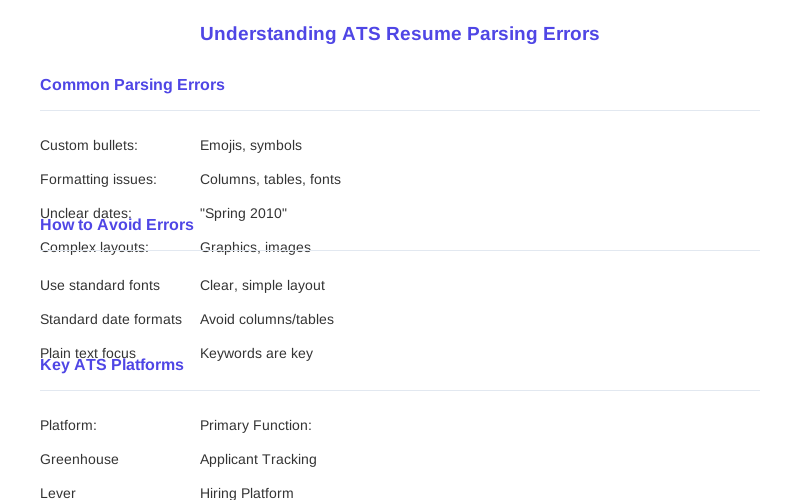
The real answer to understanding why your resume gets chewed up by an ATS isn't about 'tricking' the system; it's about understanding its fundamental limitations. Most ATS platforms, whether it's Greenhouse, Lever, or the ancient Taleo instance some companies still cling to, are built on a core parsing engine that converts your beautifully formatted document into raw, ugly text. They don't care about your clever design.
What's Actually Going On
What's actually going on behind the scenes is a systematic breakdown of your document. First, the ATS performs extraction, converting your PDF or DOCX into plain text. This is where your fancy fonts and multi-column layouts often turn into gibberish. I've seen tables collapse into a single, unreadable line.
How to Handle This
Okay, so you've seen the horror show. How do you actually get past this mess? The first step, and honestly, the only guaranteed one, is to treat your resume like a database entry, not a work of art. Forget the graphic design degree you almost got. Your goal is maximum parseability.
What This Looks Like in Practice
I've seen countless resumes fall victim to these parsing issues, leading to a lot of frustration and head-scratching from candidates. For instance, a candidate applying for a 'Senior Data Scientist' role with 12 years of experience was auto-rejected because their date format was 'Spring 2010 - Fall 2022.' The ATS couldn't compute specific months, so it flagged 'insufficient experience.' The system just doesn't understand seasonal terms.
Mistakes That Kill Your Chances
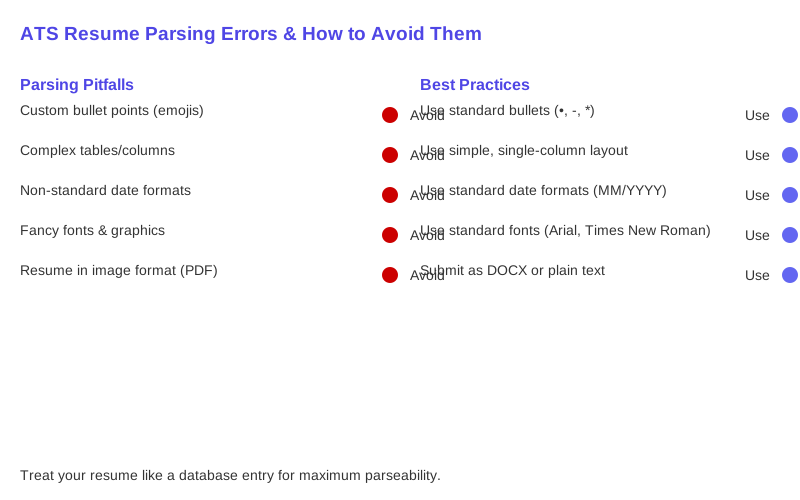
Let's be blunt: most of the 'creative' resume choices you make are actually self-sabotage. Here's a table of common mistakes I've seen kill applications, even for highly qualified candidates. Remember, the goal is clarity for a machine, not aesthetic appeal for a human. The ATS doesn't care about your artistic flair.
Key Takeaways
Look, navigating the ATS landscape feels like an unfair game because, frankly, it often is. But you don't have to be a casualty of the ATS black hole. Understanding how these systems work, not just what to do, is your real advantage. It's about playing by their broken rules to get your foot in the door.
Frequently Asked Questions
Is it worth paying a resume service for 'ATS optimization' or can I DIY it?
Do I really need to use a plain text editor to check my resume, or is copy-pasting into Notepad enough?
What if I do everything right – simple formatting, keywords – and my resume still gets rejected by the ATS?
Can using complex formatting or graphics on my resume actually cause permanent damage to my job prospects?
I heard you should hide keywords in white text at the bottom of your resume to game the ATS. Is this true?
Sources
- Top 10 ATS Resume Mistakes That Get You Rejected 2026 | NeuraCV
- ATS Resume Formatting Rules (2026): Date Formats, Tables ...
- ATS Resume Scanning: How to Fix Common Issues and Boost Your ...
- ATS Resume Common Mistakes: 10 Examples to Avoid in 2026
- ATS Parsing: Common Resume Mistakes to Avoid - Upskillist